


API pagination is a way of splitting a large API response into smaller batches, or pages, retrieved across multiple requests. Depending on the paginated API, the client may use page numbers, offsets, cursors, continuation tokens, or next-page links to retrieve subsequent batches.
In data engineering, I’m not interested in fetching one particular call. Instead, I aim first to get incremental data every day/hour/minute or get all historical data from collections that I’m interested in, known as backfill. Fetching data from APIs is one part of the wider data engineering lifecycle, where ingestion decisions depend on how quickly the data is needed and what it will be used for downstream.
Of course, every API provider is different, and we need to look into the documentation to see how to use it. After integrating a few dozen APIs, I’ve noticed some similarities. When integrating with a data source using a REST API, you typically have two types of endpoints.
- The first type provides the current state of a collection, similar to a dimension table with fewer entities, many updates, and fewer inserts.
- The second type can be a time-range one, usually a transactional type of collection, with many inserts and few or no updates. In this article, we'll focus on fetching data from paginated APIs.
How does API pagination work?
API pagination works by returning part of a collection in each response and providing a way to request the next batch.
You get the API endpoint, for example, /orders, and you will have some parameters to fill in like account, date_from, and date_to, either in a GET or POST request. The response will likely look something like this:
{
    data: [
        {
            ...
        },
        ...
    ],
    next_page: "[page_id]"
}
As you can see, we can split the response into two parts. The first part is the data itself – the list of structures from /orders collection provided in the data field. Each structure represents one document from the collection that we are pulling data from. The second part is metadata, which is not related to the collection itself but rather to fetching data from the API. In this example, we have the next_page field.
This is usually the case with APIs, where data is paginated. This mechanism limits the amount of data returned in each response, making large collections easier for both the provider and the client to process. You continue to make API calls until there is no next field available in the response. This means that you have retrieved all pages from your query.
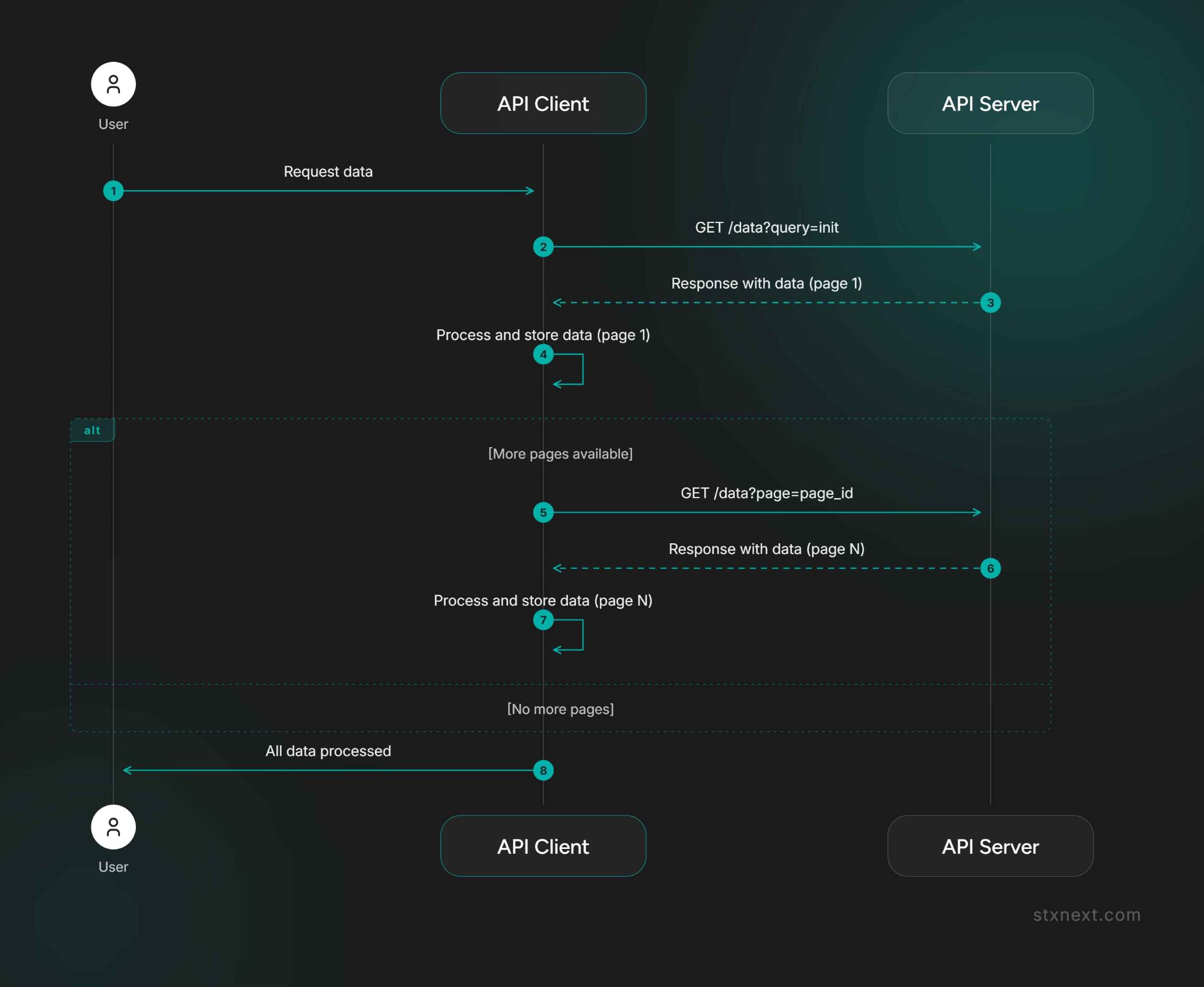
API pagination strategies
Paginated APIs use different ways to identify the next batch of data. The API pagination strategy matters because it determines how subsequent requests are made and whether pages can be retrieved independently.
When API pagination is part of a broader ingestion challenge, teams can use data engineering services to design source integrations, incremental pipelines, orchestration, and monitoring around the API.
Level 1: Naive approach
So, this is the idea. Get the first response, collect the rows from data, and append data from the next page until no more pages are available. Easy, right?
import requests
import json

def get_paginated_data(url):
    # Prepare a container for all the items
    all_data = []
    next_page = url

    # Iterate if next_page available
    while next_page:
        response = requests.get(next_page)
        response_data = response.json()
        data = response_data.get("data", [])
        next_page = response_data.get("next")
        all_data.extend(data)

    # After its done, store result as Newline Delimited JSON
    with open("data.ndjson", "w") as f:
        f.write("\\n".join([json.dumps(row) for row in all_data]))
This solution however has a major flaw. What will happen if, in the middle of collecting data, one of the responses will raise an error?
Level 2: Preventing data loss
To prevent data loss when a request fails, we can stop the fetching session gracefully and store the data that was already collected. This happens often when working with REST APIs. We are sending and receiving tons of requests and responses, so there's a high chance that at least one will fail. To prevent losing all data that was successfully fetched, let's implement a mechanism that will gracefully stop the fetching session and store the data that was already collected. Look at the api_call function.
...

# Create a function that will handle exceptions from API
def api_call(url):
    try:
        response = requests.get(url)
        response.raise_for_status()
        return response.json()
    except requests.exceptions.RequestException as e:
        # Log the error message and gracefully return
        print(f"Request failed: {e}")

def get_paginated_data(url):
    ...

    while next_page:
        response_data = api_call(next_page)

        # Stop fetching if exception was raised
        if response_data is None:
            break

        ...

    # Store data fetched before exception as Newline Delimited JSON
    with open("data.ndjson", "w") as f:
        f.write("\\n".join([json.dumps(row) for row in all_data]))
That’s better. Now, when we will run a long fetching session we can preserve what we already fetched, so we don’t need to run it again on error. This is especially useful when you need to pay for every API call, to limit the overall costs.
However, preserving the fetched data does not necessarily mean we can resume from the failed page. For that, we also need a usable cursor, continuation token, page identifier, or another checkpoint.
Level 3: Writing to a temp file
When an extraction becomes too large to keep in memory, we can store fetched data in a temporary file instead.
Our approach can work, but there are a few problems with keeping data in memory. Most important, what happens if we run out of memory on our machine? Fetching data from API is not a highly demanding task for machines, so you will probably want to use small machines to be cost-effective.
Let’s handle data sizes bigger than memory. To achieve this, we can store data in a file. This way, every piece of data from the response will be stored on the disk. This has two advantages.
- We free up memory.
- All responses will be kept if the session breaks, so we don’t lose data that was already collected.
This solution is better and more robust than previous ones, but it still has one big disadvantage. It will generate a lot of I/O operations, which are expensive and will slow down our operation. Can we do better?
Level 4: Buffered temp file
Adding a fixed-size in-memory buffer lets us reduce the number of disk writes while still keeping memory usage under control.
Another step in our ladder is to add an in-memory buffer of a fixed size. This way, we combine the advantages of the first and third levels, with the ability to tweak our fetching application to our taste. We will create a list to collect the data (buffer) from many responses and store data (flush) into the file when a certain condition is met.
For example, we can:
- store every 10th response;
- use a condition based on elapsed time, like 1 minute;
- use the size of the batch, like 1 MB of data.
This solution is a compromise, limiting the I/O operations but risking more data loss if an error occurs. We need to remember an edge case here: store the last bit of data when the flush condition cannot be met, but no next page is available. This might look something like this:
...

# Set number of items that will be stored in the buffer
BUFFER_SIZE = 10

def api_call(url):
    ...

def get_paginated_data(base_url):
    ...

    # Create a in-memory buffer to hold data before flushing
    buffer = []
    ...

    while next_page:
        ...

        # Add data to a buffer
        buffer.extend(data)

        # Flush data into temp file and clead the buffer
        if len(buffer) >= BUFFER_SIZE:
            temp_file.write("\\n".join([json.dumps(row) for row in data]))
            buffer.clear()

    # Write remaining data in buffer to file
    if buffer:
        temp_file.write("\\n".join([json.dumps(row) for row in data]))

    temp_file.close()
    return temp_file.name
Alright! A bigger BUFFER_SIZE can reduce the number of I/O operations and improve throughput, but it also increases the amount of data kept in memory and the risk of losing fetched data before the next flush.
Level 5: Continuing lost sessions
To continue an interrupted pagination session, we need a way to retry failed requests or preserve enough state to determine where the extraction should resume.
The problem with API responses is that they are maintained by a third-party provider. This means we cannot assume anything about the data we receive unless it is clearly stated in the documentation. Many APIs are not deterministic; responses for queries are generated dynamically, so the sorting of data can differ, and page order can vary. The only way to ensure we get all the data we expect is to start a paginated session and get to the end of it.
There are some recovery strategies that we can implement:
- Retry: This is easy; we can add a limited number of retries to API calls, with a cool-down between attempts to prevent losing an unfinished session. For temporary failures or rate limits, the delay can increase between retries, and we should respect Retry-After or other rate-limit information when the API provides it.
- Stateful recovery: Using this strategy, we can log the request and response of every call we make to the API. This way, we should be able to pick up a broken session and instead of starting from the beginning, start from the failed request. This gives us more flexibility and observability over our extractions but may not work for some APIs. If a paginated query has a session ID attached to it, the session can just expire—forcing us to start from the beginning.
- Date range: Someone might say, “Okay, let’s say we are getting data for a whole year, we collect some data, and then fail. Let’s get the first and last date of the data we got, and start a new query session from the last timestamp we obtained.” This seems reasonable, but it will only work if the API provider guarantees that data in the responses will be sorted. As I mentioned, this is not always the case. So please be careful when using this strategy. I do not recommend it because I don’t trust third-party providers.
Can you parallelize API pagination?
It's nearly impossible to speed up the extraction of a single paginated session using multithreading. Why is that? We cannot make another call until we get the response from the previous one because we need to obtain a page ID. In many cases, query sessions are not paginated using integers like page=1, page=2, etc., but using page hashes that look something like page=ab1f7eca802befg1. In this case, one option is to multithread independent sessions rather than pages within the same session.
Always be smart about it though; if your source API uses a page number that you can know in advance, go for it. It's just not true for all APIs. This is one of the reasons why fetching data efficiently and quickly is challenging nowadays.
Best case scenario? When from the first API call you get information about all pages (or item count), and page IDs are known from the first response. This way you can multithread calls to all pages at once, and collect the parts asynchronously.
Common challenges with paginated APIs
Beyond pagination itself, production ingestion needs to account for changing source data, provider failures, response formats, and historical records that may be updated after they were first fetched.
Data changes during pagination
What will happen when data changes in the provider's database while we are fetching our session, you ask? Good question. It depends on the provider.
The provider could just respond with an error that data changed and refuse to continue our session. Page ID changes and we just need to start from the beginning. This is why using a relatively small partition for the session is usually a smart option. We want to minimize the lost cost when something goes wrong, so keep that in mind.
Server-side API failures
Server-side problems are another thing that we need to handle. We cannot prevent them, but we can design the extraction process to recover from them. Sometimes there is a problem internally in the API provider and the server responds with a 500 error. In this case, we need to track responses, and parts that weren't successfully fetched, to retry them later, when the server failure is temporary.
JSON and alternative ways to access the data
JSON can be a challenge in itself. I can write another article about the pros and cons of JSON, but let's limit it for now to this: JSON is flexible and widely supported, but responses can be deeply nested and inefficient for transferring very large datasets.
This is not the Data Engineer’s dream… Especially not the most efficient format to transmit data in bulk. But sometimes you need to do, what you need to do, right? Before going strictly to REST API try to find alternatives.
Sometimes there is a GraphQL endpoint that lets you request the data and fields you need more selectively, although pagination can still apply. Sometimes you can “request” a data export pipeline. This will generate a separate link. Under this link, you can download all the data that you want in one bulk response. Sometimes you can even specify a format, CSV, Parquet, Avro, or protobuf.
Historical data changes
Data can be changed historically. You want to expect that API calls will be deterministic. Nothing is more misleading. Data can change historically. For example:
- You download yesterday's partition.
- You download the same partition again in a couple of days.
- The data is different because records have been updated in the source.
Some APIs will give you an “updated_at” field, so you can always get the latest version of a row, but sometimes you don’t. In this case, you may want to introduce a moving window strategy instead of daily batches, to give yourself a limit of some fixed days that you will try to get the most recent data.
For example, instead of fetching only yesterday's partition, the pipeline could repeatedly fetch the last several days and update records that have changed.
API pagination best practices
API pagination best practices focus on making data extraction recoverable, memory-efficient, and resilient to the way each provider implements pagination.
- Error handling: APIs often fail; handle errors with retries and logging.
- Memory management: Avoid memory issues by writing data to temp files.
- Efficiency: Use buffered writes to balance memory use and I/O.
- Session continuity: Implement strategies for recovering interrupted sessions.
- API variability: Always adapt to each API's unique quirks and limitations.
- Parallel processing: Fetch pages concurrently only when the pagination strategy supports independent requests and the API allows the required level of concurrency.
These practices are essential not only for paginated APIs, but also reflect broader data engineering best practices for production-grade ingestion pipelines.


