
OCR and Intelligent Document Processing Solutions That Run Where Your Data Has to Stay
Pick your OCR engine on your own documents, not on a leaderboard.
STX Next builds document intelligence pipelines that read invoices, waybills, claims forms, annual reports, and handwritten scans, then send clean, validated data to your ERP, CRM, or data platform.
Before you commit, we run models side by side on a sample of your documents, so you choose on accuracy, cost, and compliance with real numbers in hand.


What STX Next delivers
We design and implement custom OCR and intelligent document processing (IDP) systems for mid-market and enterprise companies in finance, insurance, logistics, manufacturing, and healthcare.
The right engine for each document
Our Unified OCR Gateway sends each document to the engine that fits it best, from open-source models on your own GPUs to managed services such as AWS Textract.
From raw text to usable data
A language model then turns the raw text into the exact fields, tables, and answers your systems need.
No per-page license from us
You pay for infrastructure or provider usage directly, with no per-page license from us.
Where manual document work is costing you
Most companies that come to us for document processing automation are dealing with at least one of these problems.

Manual work
Your team retypes what a model could read
Operations staff spend hours copying numbers from PDFs and scans into your ERP. As volume grows, the only lever left is more headcount, and every manual entry is a chance for an error that surfaces weeks later.

Compliance
Legal has vetoed the easy option
Public OCR APIs are quick to try, but their data processing terms can allow transfers outside the EU and changes to subprocessors on short notice. For banks, insurers, and healthcare providers, that is often the end of the conversation.

Data structure
Raw OCR text is flour. Your ERP needs bread.
A wall of extracted text helps no one. Tables lose their structure, fields are unlabeled, and someone still has to find the invoice total. Value starts after the OCR step, when the text becomes validated data.

Cost
Per-page fees grow faster than your volume plan
Managed services are easy to start and expensive to scale. At high volumes, a well-sized self-hosted setup can process the same pages for a fraction of the cost, if someone engineers it properly.


The Unified OCR Gateway: one API, the right engine for each document
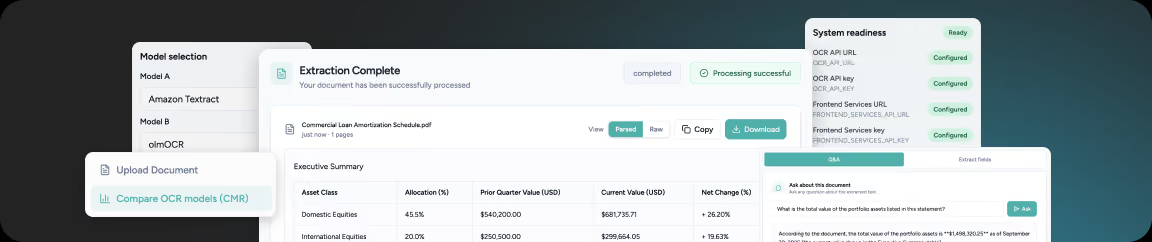
The Unified OCR & Document Intelligence Gateway is STX Next’s accelerator for document processing automation. It’s a pre-built Python code base with a single API that accepts a document, routes it to the engine of your choice, and returns normalized output no matter which model did the reading. A comparison interface shows results from several engines on the same page, side by side.
Because the routing, output normalization, and infrastructure code already exist, your project starts with a proof of concept on your documents instead of months of setup.
How a document moves through the gateway
Your documents
Invoices, waybills, claims forms, annual reports, handwritten scans
PDF, JPG, PNG
Unified OCR Gateway
One API that routes each document to the engine you choose
Normalized output
OCR engines
PaddleOCR-VL, olmOCR, dots.ocr, AWS Textract, Azure AI Document Intelligence
Open-source or managed
Extraction and validation
An LLM pulls the fields, then strict schemas and your business rules check them
Suspicious documents go to a person
Your systems
Clean records reach your ERP, CRM, or database through an API
No manual retyping
What the gateway does
Side-by-side model comparison
Process one document through open-source and cloud engines at the same time and compare the results before you choose.
Text, handwriting, and tables
Extract printed text, handwritten notes, and complex tables. Some models return tables as HTML, which keeps merged cells intact in financial statements where Markdown tables break.
Layout and position
Models such as dots.ocr return bounding boxes, so you know where each piece of text sits. That matters when a sender's address and a return address look the same but sit in different corners.
AI data extraction on top of OCR
An LLM step pulls key-value pairs (invoice number, amount, due date, policy ID) or answers questions about the document, and returns them in the format your systems expect.
Validation before anything reaches your systems
Extracted data is checked against strict schemas and your business rules. Incomplete or suspicious documents go to a person instead of your ERP.
Document classification and routing
Identify the document type from a scan or photo and route it to the right workflow or team.
Languages beyond English
None of the models we use are English-only. We check each one on your languages; our own tests included Polish print and handwriting.
Tooling
PaddleOCR-VL
olmOCR
dots.ocr
AWS Textract
Azure AI Document Intelligence
vLLM
Python
FastAPI
Terraform
React
Deploy it on-premise, in your cloud, or in hybrid mode
Where your documents are processed decides which OCR engines you can use and how much compliance review a project needs. The gateway supports four setups, from fully air-gapped to fully managed.
Data stays on-site
On-premise and air-gapped
Run open-source OCR on your GPUs; documents stay in-house. Perfect for GDPR, KNF, or medical data compliance. Pay once for hardware, avoiding monthly bills that grow with volume.
Runs on
Your own GPUs
Data stays in your cloud
Your own cloud account
We deploy the gateway in your AWS account on GPU instances with an API. Jobs queue, the cluster scales to zero when idle, and spot instances reduce costs. If an instance is reclaimed, the document returns to the queue.
Runs on
GPU instances in your AWS account
Only text leaves
Hybrid mode
OCR runs inside your infrastructure, and only anonymized text goes to a cloud language model for extraction. You get cloud-grade reasoning without sending the original documents anywhere.
Runs on
Your infrastructure, plus a cloud language model
Managed services
Fully managed
If you already run on AWS or Azure and want the fastest start, we build on AWS Textract or Azure AI Document Intelligence and add the extraction, validation, and integration layers around them.
Runs on
AWS Textract or Azure AI Document Intelligence
How we choose the OCR engine for your documents

During the first week of our collaboration, we'll answer these questions to determine which OCR engine will be best for your organization.
01
Can your documents leave your infrastructure?
If not, we build on open-source models you host.
02
How many pages a month?
High volume favors self-hosted models with batching or batch-priced APIs. Low volume favors managed services.
03
Are you committed to one cloud?
If your policies only allow AWS or Azure services, we use that provider's OCR so you are not waiting months for approval of an outside vendor.
04
What is inside the documents?
Dense tables, handwriting, stamps, and layout-dependent fields each point to different models. About fifty samples of a document type are usually enough to see which engine handles it best.
What OCR costs to run at your volume
OCR is billed in three ways: per page for managed services and OCR APIs, per token for general-purpose multimodal models, and per GPU hour when you host models yourself. Which one is cheapest depends on your volume and on how well the self-hosted setup uses its hardware.
Our benchmark, one page at a time
About $5
per 1,000 pages
olmOCR on a single AWS GPU instance, processing one page at a time.
Our capacity model, batched on FP8 GPUs
$0.27 to $0.55
per 1,000 pages
The same model once requests are batched on GPUs that support FP8. The more pages you process, the larger that gap becomes.
Setup
How you pay
Best fit
Managed OCR service (AWS, Azure)
Per page
Low to medium volume, fastest start, one-cloud policies
General-purpose multimodal model
Per token
Mixed, irregular documents that need reasoning
Self-hosted open-source model
Per GPU hour
High volume, strict data residency, predictable cost

By running entirely on-premise, our OCR gateway ensures your data never leaves your secure perimeter, giving you full control, zero cloud exposure, and predictable costs.

Marek Olejniczak
Director of AI at STX Next
Intelligent document processing by industry
Document intelligence pays off fastest where documents arrive in high volume and follow a recognizable pattern. These are the document-heavy processes we build for.
Banking and Financial Services
Annual reports & KYC
Pull financial indicators and full tables from hundreds of pages of annual reports, extract data from KYC documents on-premise or in hybrid mode, and send invoice data straight into accounting systems.
Insurance
Claims forms
Read claims forms, repair estimates, and email attachments at intake, and hand adjusters structured data instead of PDFs. For the full claims workflow, see our AI claims automation accelerator.
Manufacturing and Industrial
Purchase orders
Read supplier release schedules, purchase orders, and quote requests that arrive as PDFs, spreadsheets, and photos, and reconcile them against SAP or your ERP automatically.
Transport and Logistics
Waybills & bills of lading
Extract sender, receiver, timestamps, and handwritten notes from waybills and bills of lading, including low-quality scans, so shipments can be tracked without manual entry.
Healthcare
Medical records
Process medical records and billing documents on infrastructure you control, where patient data never reaches a public API.
Education, HR, and Recruitment
Applicant documents
Classify and verify documents that applicants upload as scans or phone photos, and flag what is missing before anyone opens the file.
Case studies
Our expertise comes from implementing dozens of real-world solutions for clients in document-heavy industries.
Berry Recruitment Group: ML classification of scanned and photographed documents
Berry Recruitment needed to confirm that clients had uploaded every document a job application requires. Most uploads were scans or phone photos, and the archive had no consistent labels. STX Next labelled around 46,000 documents and trained an image classification model. It sorted uploads by type and flagged missing or incorrect documents across up to 68,000 images.
Recruitment | United Kingdom
Linde: document ingestion with OCR and table handling for knowledge retrieval
Linde's operating knowledge was spread across multilingual PDFs, scans, and tables that staff searched manually. STX Next built an ingestion layer on Azure Document Intelligence and OCR that reads scanned and digital documents, handles tables separately from body text, and tags content with metadata before indexing. Employees now ask questions in their own language and get answers with citations.
Industrial gases and engineering | Germany
Tour Partner Group: AI extraction from booking emails
Sales specialists at Tour Partner Group read booking request emails manually, which slowed responses and limited scale. STX Next built a pipeline that classifies each email, detects and translates its language, and extracts the key booking details. Checking whether dates were available went from 30 minutes to 15 seconds.
Hospitality and travel | Northern Europe
From sample documents to production
Why companies choose STX Next as their OCR company
Months of OCR research, already done
Our team has benchmarked open-source OCR models, managed services, and multimodal LLMs on cost, speed, and document types, and built the deployment architecture around the results. Your project starts from those findings.
No favorite vendor
We have no license to sell. We recommend AWS Textract when it is the right answer and a self-hosted model when it is not.
Compliance treated as a design input
On-premise, air-gapped, and hybrid deployments are standard options for us, not exceptions we negotiate.
OCR is the first step, not the product
The same team builds the extraction, validation, integration, and retrieval layers, so your documents can later feed a RAG knowledge assistant or AI agents without changing vendors.

Engineering depth behind the delivery
STX Next has worked with Python for more than 20 years, is an AWS Advanced Tier Services Partner, and holds ISO/IEC 27001 certification.
Bring a sample of your documents
Send us a representative set of the documents your team processes by hand. We will show you which OCR engine reads them best, what it would cost at your volume, and where it can run.


FAQ
How long does it take to implement an OCR solution?
TODO: answer copy is missing in the Figma file.
How much does intelligent document processing cost to run?
TODO: answer copy is missing in the Figma file.
Can OCR run on-premise or in an air-gapped environment?
TODO: answer copy is missing in the Figma file.
Which OCR engine do you use?
TODO: answer copy is missing in the Figma file.
How accurate is OCR on scans and handwriting?
TODO: answer copy is missing in the Figma file.
What document types and file formats do you support?
TODO: answer copy is missing in the Figma file.
How does extracted data get into our ERP or CRM?
TODO: answer copy is missing in the Figma file.
Does it work with languages other than English?
TODO: answer copy is missing in the Figma file.
Do we pay STX Next a license or per-page fee?
TODO: answer copy is missing in the Figma file.
Can OCR output feed a RAG system or AI agents?
TODO: answer copy is missing in the Figma file.


